
Multipart Components in OLX#
In OLX, authors can create one component that gate multiple problems behind a single Submit button.
Multiple Problems in One Component#
Authors can create a problem that includes more than one response type. For
example, authors might want to create a numerical input problem and then include a
multiple choice problem that refers to the numerical input problem. Or,
authors might want a learner to be able to check the answers to many problems at
one time. To do this, authors can include multiple problems inside a single
<problem> element. The problems can be different types.
Each question and its answer options are enclosed by the element that
identifies the type of problem, such as <multiplechoiceresponse> for a
multiple choice question or <formularesponse> for a math expression input
question.
A different explanation for each question can be supplied by using the
<solution> element.
As a best practice, Open edX accessibility best practices recommend that
unformatted paragraph text between the questions be avoided; insert text
using a <div> element. Screen readers can skip over text that is inserted
among multiple questions.
Elements such as the Submit, Show Answer, and Reset buttons, as well as the settings that are selected for the problem component, apply to all of the problems in that component. Thus, if the maximum number of attempts is set to 3, the learner has three attempts to answer the entire set of problems in the component as a whole rather than three attempts to answer each problem individually. If a learner selects Submit, the LMS scores all of the problems in the component at once. If a learner selects Show Answer, the answers for all the problems in the component appear.
Note
Custom JavaScript cannot be used in a component that contains more than one problem. Each custom JavaScript problem must be in its own component.
Create a Multipart Component#
Typically when making a problem component, there is
one type of component nested within the <problem> element. However, in a
multipart component, authors can nest multiple components within a single
<problem> element.
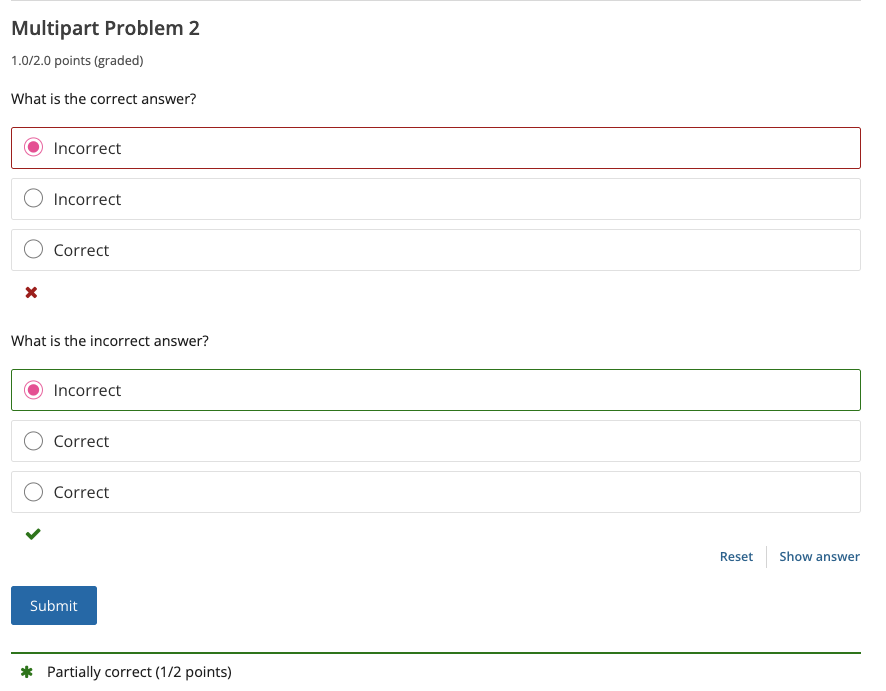
An example of a multipart problem follows:
<problem display_name="Multipart Problem 2" rerandomize="never" show_reset_button="true" showanswer="finished" weight="2.0">
   <multiplechoiceresponse>
      <div>What is the correct answer?</div>
      <choicegroup>
         <choice correct="false">
            <div>Incorrect</div>
         </choice>
         <choice correct="false">
            <div>Incorrect</div>
         </choice>
         <choice correct="true">
            <div>Correct</div>
         </choice>
      </choicegroup>
      <solution>
         <div class="detailed-solution">
            <p>Explanation</p>
            <p>The correct answer is called "Correct"</p>
         </div>
      </solution>
   </multiplechoiceresponse>

   <multiplechoiceresponse>
      <div>What is the incorrect answer?</div>
      <choicegroup>
         <choice correct="true">
            <div>Incorrect</div>
         </choice>
         <choice correct="false">
            <div>Correct</div>
         </choice>
         <choice correct="false">
            <div>Correct</div>
         </choice>
      </choicegroup>
      <solution>
         <div class="detailed-solution">
            <p>Explanation</p>
            <p>The correct answer is called "Incorrect"</p>
         </div>
      </solution>
   </multiplechoiceresponse>
</problem>
Note in the above example, there is exactly one <problem> element. Within
this element, there are two <multiplechoiceresponse> elements.
Multipart Grading#
The LMS will distribute the total number of points available for the problem
evenly across all problems. So in the above example (worth 2.0 points -
weight="2.0"), if a learner answers one part correctly and the second
incorrectly, they will be awarded 1/2 points.
See also
What is Open Learning XML? (concept)
Problem Components in OLX (reference)
Components & Activities (reference)
Example of an OLX Course (reference)
Getting Started with OLX (quickstart)
What is the OLX Course Structure? (reference)
Maintenance chart
Review Date |
Working Group Reviewer |
Release |
Test situation |
2025-11-06 |
sarina |
Ulmo |
Pass |