
Roles and Permissions in Libraries#
The Ulmo release introduces the first phase of the new roles and permissions system for the Open edX platform. This first phase focuses on establishing a shared roles & permissions service and connecting it to Libraries, so the same model can be extended to other parts of the platform over time.
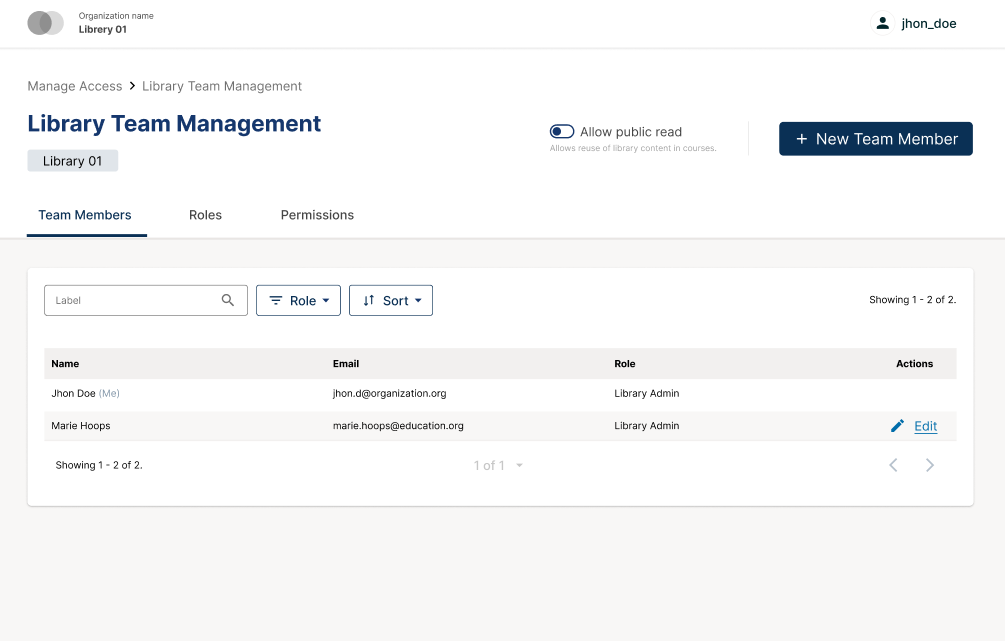
Any user who has a role in a library can open the library team manager in the new Administrative Console from Studio. This view shows all members of the library, the role each person holds, and the permissions associated with each role. Library Admins and global site admins can use this view to assign or revoke roles for that library, so team membership and role information live in a single place.
The goal of the Ulmo MVP is to introduce the new roles and permissions model to Libraries with functional parity and a clearer model of roles, not to change how authors create or reuse content.
Migrate Legacy Libraries
Legacy Libraries do not support the new Roles & Permissions functionality. Upgrade Legacy Libraries in order to take advantage of this new feature! To learn more view the migration documentation.
What’s Available in Ulmo#
The Ulmo release includes:
Library scoped roles (Roles): Library Admin, Library Author, Library Contributor, and Library User, each mapped to a defined set of permissions that control who can view, edit, publish or reuse library content, and who can manage the library team.
Matrix of Content Library Roles and Permissions# Permissions
Library Admin
Library Author
Library Contributor
Library User
Library
content_libraries.view_library
✅
✅
✅
✅
content_libraries.manage_library_tags
✅
✅
✅
❌
content_libraries.delete_library
✅
❌
❌
❌
Content
content_libraries.edit_library_content
✅
✅
✅
❌
content_libraries.publish_library_content
✅
✅
❌
❌
content_libraries.reuse_library_content
✅
✅
✅
✅
Team
content_libraries.view_library_team
✅
✅
✅
✅
content_libraries.manage_library_team
✅
❌
❌
❌
Collections
content_libraries.create_library_collection
✅
✅
✅
❌
content_libraries.edit_library_collection
✅
✅
✅
❌
content_libraries.delete_library_collection
✅
✅
✅
❌
A new “Library Contributor” role that matches most of the Library Author capabilities for creating and editing content, managing tags and collections, and reusing content, but cannot publish content. They support the authoring process while leaving final publishing to Authors or Admins.
A library team management page in the Administrative Console. Any user who has a role in a library can open this view to see all members, their roles and the available role definitions. Library Admins and global site admins use the same view to assign or revoke roles for that library, so team membership and role information are managed from a single place.
An automatic migration that replicates existing library roles into the new system, so current configurations are preserved without manual changes.
Scope and Impact#
The new roles and permissions system applies only to Content Libraries, not Legacy Libraries. It replaces the previous library specific permissions logic with library-scoped roles surfaced through the Administrative Console.
The scope of this release is limited to:
Libraries created and managed in Studio
Library level roles and permissions managed through the Administrative Console
Migration of existing library role assignments into the new roles & permissions system
The following areas are not affected in Ulmo:
Courses, course roles and course level permissions
Forums, cohorts and other runtime features
Any legacy library implementations that have not yet been migrated to Content Libraries
Migration of Existing Library Access#
Ulmo includes an automated migration path for existing library access configurations.
During the upgrade to Ulmo, current library role assignments are mapped into the new roles & permissions system automatically via the Ulmo upgrade. The intent is to preserve who can access each library and what they can do, without requiring manual configuration from platform operators.
After the upgrade, operators and Library owners can review library teams in the Administrative Console to confirm that roles and access levels look correct. For most deployments that already use Libraries, no additional action should be required beyond this validation step.
Future improvements#
After Ulmo, the Roles and Permissions work is expected to evolve in several directions:
Extending the same Roles & Permissions model beyond Libraries. Course authoring is the next candidate, and future phases will expand the roles and permissions pattern to Studio, forums, and other product areas.
Introducing more advanced administration features in the Administrative Console, allowing for managing multiple scopes at once, listing users’ roles across scopes, and granting roles to multiple scopes in one action.
Exploring support for custom roles, based on feedback from operators who manage large instances.
These improvements will be scoped and tracked in future releases once the Libraries integration is validated in production. Be sure to Stay Up To Date with Verawood!
Maintenance chart
Review Date |
Working Group Reviewer |
Release |
Test situation |
2025-12-11 |
Product WG |
Ulmo |
Pass |